How to Build Your Own Gang Sheet
and then arrange your artwork easily. Here's how it works:
-
Step 1 — Select size
Go to Build a Gang Sheet page. All gang sheets are 22" wide. Length options are 2, 3, 5, 7, 10, 13, 15, 18, or 20 feet. Pick the length that best matches your project.
-
Step 2 — Build your own gang sheet
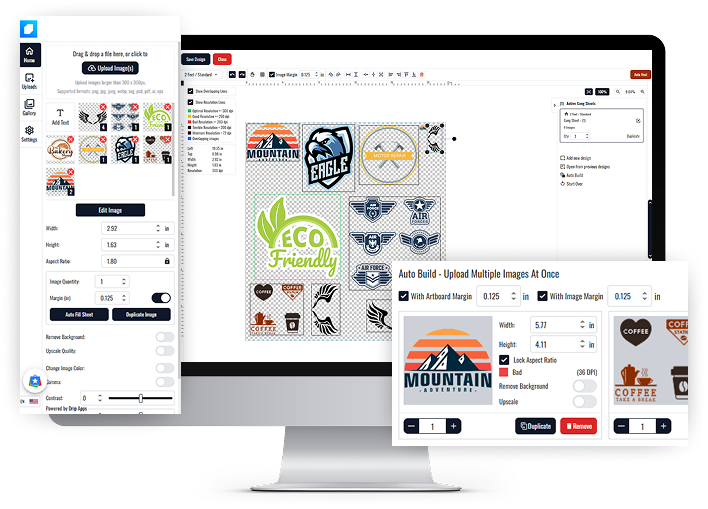
Click the Build your own gang sheet button to open the editor. A blank sheet will appear, ready for your designs.
-
Step 3 — Upload & arrange
Upload your images into the editor and drag them into position on the sheet.
- Auto Fill Sheet — Upload your design and click Auto Fill Sheet to automatically fill the entire gang sheet with that design.
- Duplicate Image — Select a design and click Duplicate Image to quickly make extra copies of it.
- Auto Build — After you upload your design click Auto Build on the right panel, set a specific width and height. Enter the quantity you need (for example, 5) and click Apply. The builder will automatically place that many copies onto the sheet.
-
Step 4 — Save & add to cartOnce your layout is finalized, select Save Design, enter a name, and then click Add to Cart to proceed.
Pro tip: Use high-resolution, print-ready artwork (PNG with transparent background at 300 DPI. Add 1-2 mm spacing for easy trimming.
How to Upload Your Gang Sheet
-
Step 1 — Go to Upload Your Gang Sheet
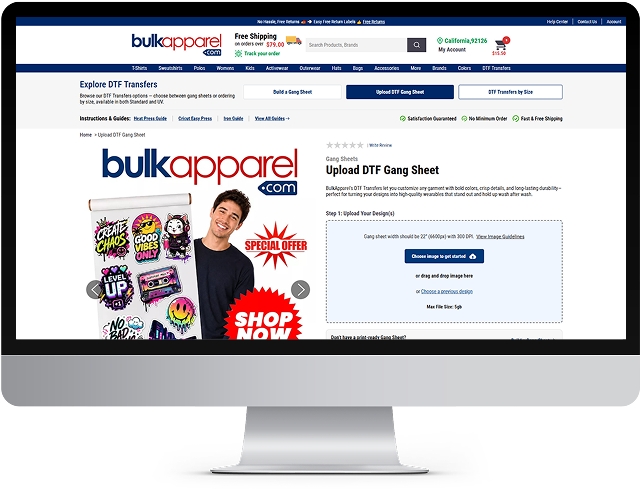
If you have a print-ready file, simply upload it on the Upload Your Gang Sheet page to get started.
-
Step 2 — Set design size
The width is fixed at 22”. Enter the desired length (in feet) for your transfer.
-
Step 3 — Add quantity
Enter the quantity of transfers you need. You'll see the total price update automatically.
-
Step 4 — Add to cartOnce the setup is complete and everything looks correct, click Add to Cart to move forward with your order.
Pro tip: The width is fixed at 22″. You just set the length and quantity you need. Pricing updates instantly so you always know your cost before adding to cart.
Try DTF Gangsheet on BulkApparel Now!
Experience the easiest way to create and order your own DTF gang sheets online
Enjoy premium quality transfers, lightning-fast turnarounds, and unbeatable consistency
Build Your Gang Sheet Now!Frequently Asked Questions
Answer
DTF stands for Direct to Film, a printing method where your design is printed onto a special film and then transferred to fabric using heat. It works on a variety of materials like cotton, polyester, and blends. Just press it with a heat press for about 15 seconds and you’re done! It’s perfect for vibrant, long-lasting prints.
Answer
No minimum order quantity. Order 1 or 1,000 whatever you need!
Answer
A standard clamshell or swing-away heat press will work. Just ensure consistent pressure and accurate temperature.
Answer
We offer various sheet sizes including A4, A3, 22"x24", and custom gang sheet formats.
Answer
Our DTF transfers are made with premium inks and adhesive powder, tested to withstand 50+ washes with proper application.
Answer
Most orders are processed within 1-2 business days and shipped via your selected carrier method.
Answer
We accept .PNG, .PSD, .TIFF, .AI, and .PDF formats. Transparent backgrounds recommended.
Answer
We stand by our quality. If there's a defect or issue, contact support within 7 days and we'll make it right.